Quick answer: No — 121 is not a working Jio customer care number, so you can’t reach Jio support by dialing it from the Jio4GVoice (now JioCall) app or from your regular dialer. 121 is Airtel’s customer care shortcode, not Jio’s. If you’re on a Jio SIM, the correct numbers to reach customer support are 198 (toll-free, for Jio numbers) and 199, or 1800 889 9999 from any non-Jio number.
If you’ve just switched to Jio from another network, this mix-up is extremely common — and understandable. Here’s exactly why 121 doesn’t work on Jio, what number actually does, and how to reach Jio support directly from the Jio4GVoice / JioCall app.
Why 121 Doesn’t Work on Jio
In India, each telecom operator has its own dedicated customer care shortcode, and these numbers are not interchangeable between networks:
- 121 — Airtel’s customer care number
- 198 / 199 — Jio’s customer care numbers
- 12345 — Vodafone Idea (Vi) customer care number
- 1503 — BSNL customer care number
These shortcodes are tied to the specific operator’s network and billing system, so dialing another carrier’s number from a Jio SIM simply won’t connect — you’ll typically get a “number does not exist” or “invalid number” message, whether you dial it from a regular phone dialer or from within the Jio4GVoice / JioCall app.
The Correct Jio Customer Care Numbers
If you’re trying to reach Jio support, use one of these instead:
- 198 — Toll-free, available from a Jio number, 24/7
- 199 — Also toll-free from a Jio number, and the number Jio’s own support pages list for general queries
- 1800 889 9999 — Toll-free, and the number to use if you’re calling from a non-Jio number (for example, a friend’s phone or a landline)
According to Jio’s official support page, these are the numbers listed for Jio recharge plans, JioFiber, bill payments, and general account queries.
How to Call Jio Customer Care From the Jio4GVoice / JioCall App
The Jio4GVoice app was Jio’s original VoLTE and VoIP calling app; it has since been rebranded and folded into the JioCall app, which now handles voice and video calling for Jio users — including on phones or SIM configurations that don’t support native VoLTE calling. Here’s how to reach customer care through it:
- Open the JioCall app (or Jio4GVoice, if your device still shows the older version).
- Tap the dial pad icon, just like you would on your phone’s regular calling app.
- Enter 198 or 199 and tap the call button.
- Follow the automated menu (IVR) to reach the right department — recharge issues, network complaints, billing, or SIM-related queries.
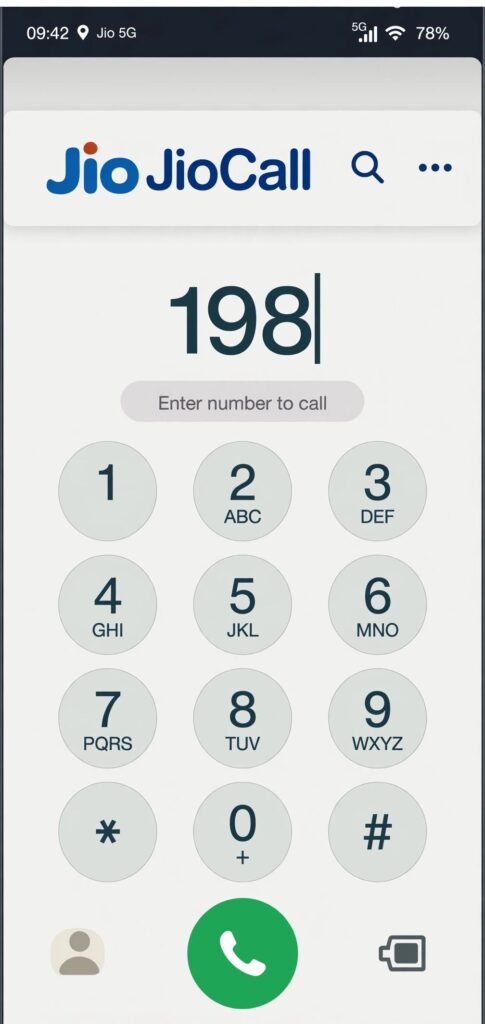
198 and 199 are the correct numbers to dial from JioCall — not 121.
What the JioCall / Jio4GVoice App Actually Does
It’s worth understanding what this app is for, since it’s a common source of confusion. As Jio’s own support documentation explains, JioCall brings 4G HD voice and video calling to smartphones — including 2G and 3G phones connected through a JioFi device, and 4G LTE phones that don’t have native VoLTE support. It works over VoIP using your Jio SIM number, meaning you can make and receive calls to any mobile or landline number in India, send SMS, and even use RCS features like in-call sharing and group chats, all from the app itself.
In other words, the app is a full calling and messaging tool built around your Jio number — it isn’t limited to customer care calls, and 198/199 will work through it exactly the same way any other number does.
Other Ways to Reach Jio Support
If dialing 198 or 199 isn’t convenient, Jio also offers several alternative support channels:
- MyJio App — Has a built-in chat and help section for recharges, plan changes, and complaints
- Live Chat — Available on Jio’s official website for general queries
- WhatsApp Support — Jio operates a WhatsApp-based support number for quick queries and complaint tracking
- Jio Care Centers — Physical stores for SIM-related issues, KYC, or device problems that can’t be resolved remotely
A Quick Way to Remember Which Number Belongs to Which Carrier
If you’ve recently ported your number to Jio, or you’re managing multiple SIMs from different carriers, it helps to save the correct customer care number directly in your phone’s contacts labeled clearly — for example, “Jio Care 199” — so you’re not relying on memory or old habits from your previous network.
If you’re also having trouble getting voice calls to work at all on an older device, the issue is often related to VoLTE compatibility rather than the customer care number. Our guide on how to get Jio voice calls working on an iPhone 5s walks through why some older phones can’t call natively on Jio’s network and how to fix it using the same JioCall app.
Key Takeaways
- 121 is Airtel’s number, not Jio’s — it will not connect from a Jio SIM or the Jio4GVoice / JioCall app.
- 198 and 199 are Jio’s correct customer care numbers, both toll-free from a Jio SIM.
- 1800 889 9999 works from any number, including non-Jio phones and landlines.
- The JioCall app (formerly Jio4GVoice) lets you dial these numbers exactly like a normal call, and also functions as a full VoIP calling app for phones without native VoLTE support.
Sources referenced:
