To stop your JioTune, open the JioTunes section in the MyJio app, find your active tune and tap the Deactivate or Stop option. Once the change goes through, people who call you hear the standard ringing sound again. Jio usually confirms it by SMS.
This guide walks you through the steps, shows how to check that the tune has really stopped, and explains what to do if callers still hear music. It also clears up a common doubt: you do not need to deactivate a tune just to change the song.
- Open MyJio, go to JioTunes, select your active tune and tap Deactivate or Stop.
- Make sure the correct number is selected if you manage more than one in MyJio.
- Wait for the confirmation SMS, then ask someone to call you as a test.
- To switch to a different song, simply set a new tune. It usually replaces the old one.
What Happens When You Deactivate a JioTune
A JioTune is the song your callers hear while your phone rings. It is played by Jio’s network, not by your handset. When you deactivate it, the network stops playing the song and callers hear plain ringing instead.
Nothing changes on your own phone. Your ringtone, contacts and settings stay as they are. You can also set a JioTune again whenever you like.
Before you deactivate, ask yourself what you want:
- Plain ringing for callers: deactivate the tune using the steps below.
- A different song: skip deactivation and set the new song directly. In most cases it replaces the old one.
Before You Start
Check these points so the request goes through first time:
- The right number. If you have linked several Jio numbers in MyJio, switch to the one with the tune you want to stop.
- An updated app. Update MyJio from the Play Store or App Store. Older versions may place options differently.
- Internet access. Mobile data or Wi-Fi both work.
How to Deactivate JioTunes in MyJio, Step by Step
The labels can differ slightly between app versions, but the flow is usually the same on Android and iPhone.
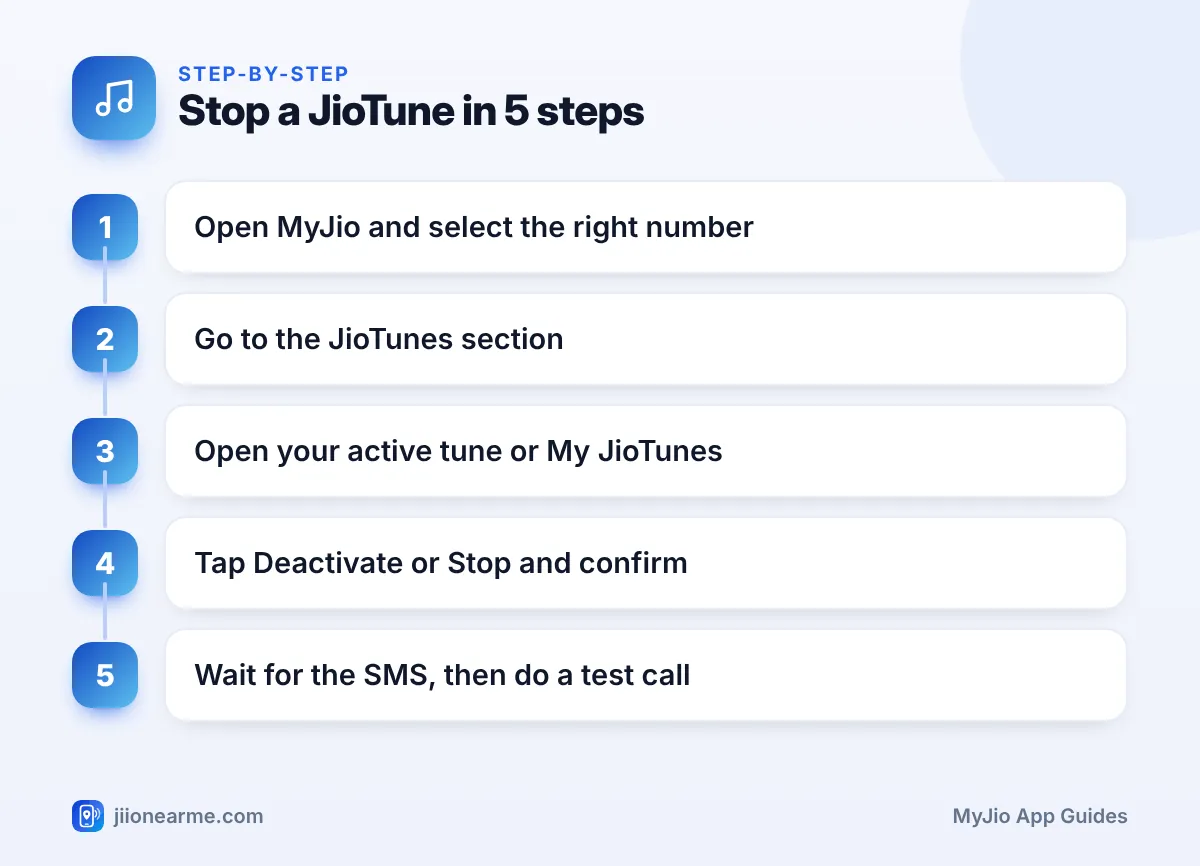
- Open the MyJio app and check that the correct number is shown at the top.
- Tap the search bar and type JioTunes, or open the menu (☰) and look for JioTunes among the services.
- Look for a heading such as My JioTunes, Active tune or Manage. Your current tune should be listed there.
- Tap the active tune, or the three dots next to it.
- Choose Deactivate, Stop or Remove.
- Read the confirmation message and tap Confirm or Yes.
- Wait for an SMS from Jio confirming that the tune has been deactivated.
MyJio updates its layout from time to time. If you do not see the words used here, look for anything that shows your current caller tune. The stop option is normally placed next to it.
If You Cannot Find the Deactivate Option
Sometimes the option is not where you expect it. Try these:
- Update MyJio and open the JioTunes section again.
- Make sure you are signed in to the number that actually has the tune.
- Check whether the JioTunes page shows any tune as active. If none is listed, the tune may already be off.
- If you still cannot find it, call Jio on 199 from your Jio number and ask them to stop the caller tune.
How to Check That Your JioTune Has Stopped
Do not rely only on tapping the button. Confirm the change in three ways:
- Read the SMS. Jio usually sends a message once the tune is deactivated. This can take a little while.
- Check MyJio. Go back to the JioTunes section. Your old tune should no longer appear as active.
- Do a test call. Ask a family member or friend to call you and let it ring for several seconds. They should hear normal ringing.
Ask your test caller to stay on the line for at least five or six rings. Some tunes have a quiet start, so a very short call may not tell you whether music is still playing.
Why Callers May Still Hear a Tune
If your test caller still hears music, use this table to find the reason.
| What you notice | Likely reason | What to try |
|---|---|---|
| Same song plays soon after | Change still being applied | Wait a while and test again |
| Song plays after many hours | Request did not go through | Repeat the steps in MyJio |
| Tune stopped on the wrong line | Different number was selected | Switch numbers and deactivate again |
| No SMS at all | Request still pending or failed | Check MyJio, then call 199 |
| A short message plays before ringing | Network announcement, not a JioTune | Nothing to change in MyJio |
A few more points:
- Reinstalling MyJio does not remove a JioTune, because the tune lives on the network.
- If your plan has expired, recharge first. Some services and settings may not update while the number is inactive.
- If the tune keeps playing a day after you deactivated it, call 198 to register a complaint. Note the reference number you are given.
Stopping a Tune vs Replacing It
Many people deactivate a tune only to set another one a minute later. That extra step is not needed.
- Replacing a tune means setting a new song from the JioTunes section. The new song usually takes over after the normal activation time.
- Stopping a tune removes the music altogether, so callers hear standard ringing until you set another tune.
If you are not sure which tune is active, open the JioTunes section in MyJio and check what is listed as your current tune.
You do not need to pay anyone or share an OTP to stop a JioTune. If a call or message offers to deactivate your tune for a fee or asks for an OTP, ignore it. You can report it through Chakshu on the Sanchar Saathi portal.

Frequently Asked Questions
Will deactivating my JioTune change my ringtone?
No. The JioTune is what your callers hear. Your ringtone is set on your phone and stays exactly the same.
How long does it take for a JioTune to stop?
It usually takes a short while. Jio normally sends an SMS once the change is done, and a test call after that is the best check.
Can I set a JioTune again after deactivating it?
Yes. Open the JioTunes section in MyJio at any time, pick a song and set it. The usual activation steps apply.
Do I need to stop my old JioTune before setting a new one?
Usually not. Setting a new tune normally replaces the old one. Check the JioTunes section afterwards to confirm which tune is active.
Does switching off my phone stop the JioTune?
No. While your phone is off, callers hear a switched-off message instead of ringing. The tune stays set on your number and plays again once your phone is back on.
Final Thoughts
To deactivate JioTunes, open MyJio, go to the JioTunes section, select your active tune and tap Deactivate or Stop. Wait for the SMS and ask someone to call you to confirm plain ringing. If the tune keeps playing after a reasonable wait, repeat the steps on the correct number or contact Jio on 199.
JIo Near me is an independent guide and is not affiliated with Reliance Jio. App menus, plans and policies can change – always confirm current details in the official MyJio app or on jio.com. We will never ask for your OTP, PIN or passwords.
