
Reliance Jio relies entirely on VoLTE (Voice over LTE) for voice calls since it has no 2G/3G fallback for voice. In dual SIM phones, enabling and maintaining VoLTE on the Jio SIM — especially when using a second SIM (Airtel, Vi, BSNL, etc.) for data or calls — often causes problems like no VoLTE icon, call drops, no incoming/outgoing calls, data switching issues, or the Jio SIM dropping to no service during calls.
Why These Issues Occur
Jio VoLTE issues in dual SIM setups stem from hardware, software, and network limitations:
- Single active radio/modem limitation — Most Android phones (even in 2026) support only one active 4G/5G data connection at a time. If the second SIM uses mobile data, the phone dedicates the LTE/5G modem to it, forcing the Jio SIM to downgrade (no VoLTE → no calls, as Jio has no fallback).
- SIM slot priority — Some phones enable VoLTE better on Slot 1 (primary) than Slot 2.
- Device compatibility & settings — Older phones, custom ROMs, imported devices, or disabled VoLTE toggles prevent registration.
- Network registration glitches — Temporary registration failure, outdated carrier settings, or conflicts with Wi-Fi calling/5G.
- Dual active data conflicts — When data is on the non-Jio SIM, Jio loses VoLTE registration, leading to “No Service,” busy tone, or drops.
Common symptoms:
- VoLTE icon missing or not showing “HD” calls.
- Outgoing calls fail, incoming shows “out of coverage.”
- Calls drop when moving or during data use on second SIM.
- Jio works fine alone but fails with second SIM active.
Step-by-Step Methods to Fix Jio VoLTE & Second SIM Issues
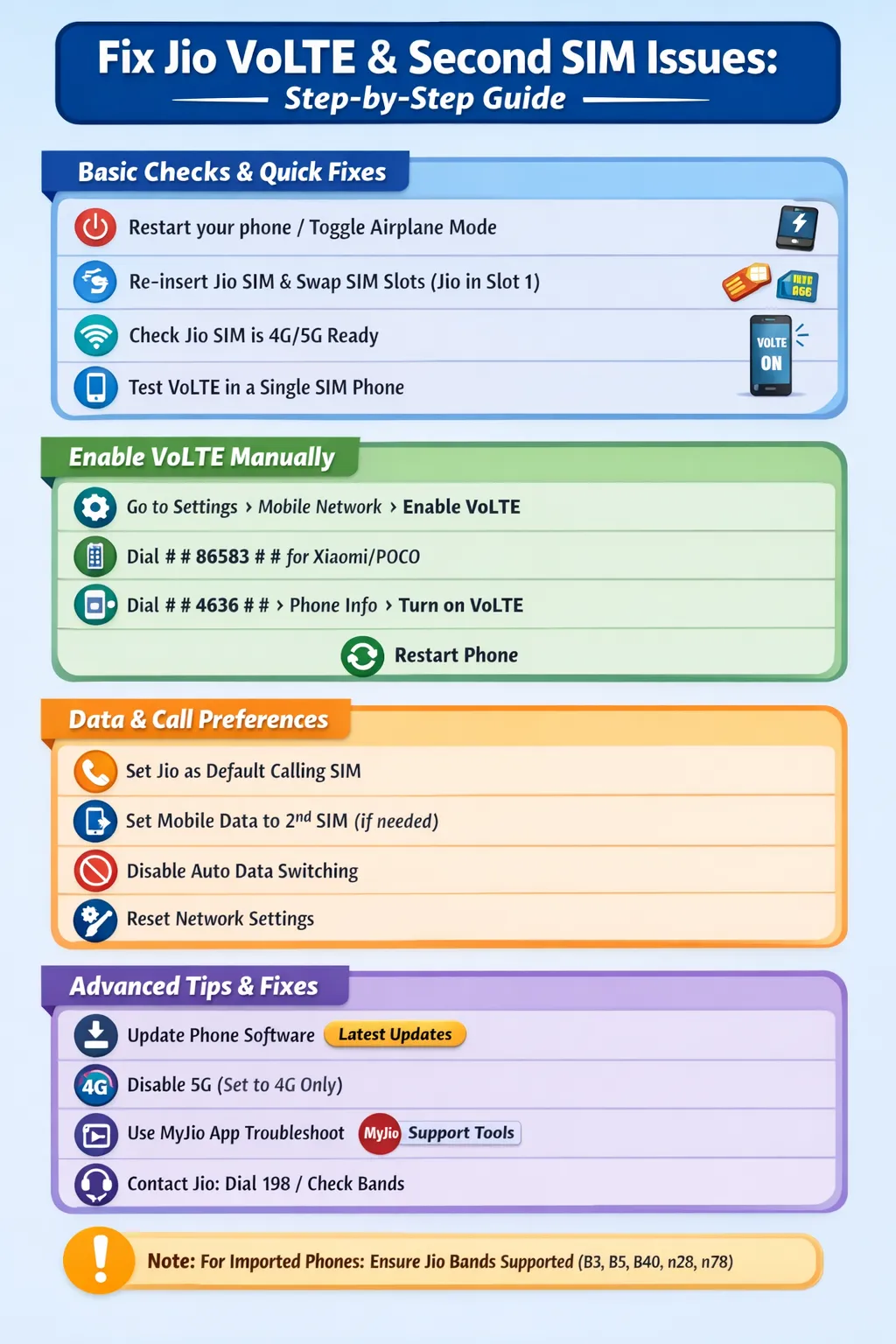
Follow these in order — most users resolve it in the first few steps.
- Basic Checks & Quick Fixes
- Restart your phone (or toggle Airplane Mode for 30 seconds).
- Re-insert the Jio SIM (clean the tray and contacts).
- Swap SIM slots: Put Jio in Slot 1 (primary) and the second SIM in Slot 2 — many phones prioritize VoLTE on Slot 1.
- Ensure Jio SIM is 4G/5G-ready and activated (test in a single-SIM phone if possible).
- Enable VoLTE Manually on Android
- Go to Settings > Network & Internet (or Connections) > Mobile Network (or SIM & Network).
- Select the Jio SIM.
- Enable VoLTE (or HD Voice, Enhanced 4G LTE Mode, 4G Calling).
- Set Preferred network type to 5G/4G/3G/2G (Auto) or LTE/4G only for the Jio SIM.
- For some Xiaomi/Realme/POCO: Dial ##86583## in the dialer → Message “VoLTE carrier check was disabled” appears (forces enablement).
- For hidden menus: Dial ##4636## → Phone information → Select Jio SIM → Turn on VoLTE provisioned (if available).
- Restart the phone.
- Set Data & Calling Preferences Correctly
- Go to Settings > Network & Internet > SIMs (or Dual SIM settings).
- Set Mobile Data to the second SIM (if you want its data) — but enable VoLTE on Jio anyway.
- For calls: Set Default calling SIM to Jio (or ask “every time”).
- Disable Auto data switching or Smart data switch if it causes drops.
- If second SIM data is needed during Jio calls: Some phones (Samsung/OnePlus newer models) support “Use mobile data during VoLTE calls via secondary SIM” — enable it if available.
- Reset Network Settings (Safe & Effective)
- Go to Settings > System > Reset options > Reset Wi-Fi, mobile & Bluetooth (or Reset network settings).
- This clears APN, carrier configs, and glitches without deleting apps/data.
- After reset: Re-enable VoLTE, set preferred networks, and restart.
- Additional Tips & Advanced Fixes
- Update your phone’s software — Check for system updates (many 2025-2026 patches fix VoLTE bugs on Samsung, Pixel, etc.).
- Disable 5G temporarily (set to 4G only) if 5G handover causes drops.
- Use MyJio app: Go to Support > Troubleshoot > Run diagnostics → Follow prompts.
- If VoLTE still missing: Install Jio4GVoice app from Play Store (legacy fix for some older/custom ROMs).
- Contact Jio: Dial 198 or use MyJio to report “VoLTE not registering” — they may re-provision the SIM.
- For imported/foreign phones: Ensure device supports Jio bands (B3, B5, B40 for 4G; n28/n78 for 5G) and is certified for Indian networks.
Final Thoughts & Prevention
In most dual SIM cases, the fix is simple: Put Jio in Slot 1 + Enable VoLTE + Use second SIM only for data (not forcing Jio to fallback). True dual 4G/5G standby (both SIMs on LTE/5G simultaneously) is rare even in 2026 — it’s hardware-limited on many models.
If issues persist after these steps (e.g., hardware fault or specific phone bug), visit a Jio store or consider a phone with better dual SIM VoLTE support (like recent Samsung Galaxy, Google Pixel with updates, or OnePlus).
Test after each step by making/receiving a call. Share your phone model and exact symptoms for more specific advice!
Also check our articles on:

Share our products, reap the rewards—apply to our affiliate program!
Share your unique link and cash in—join now!
Drive sales, collect commissions—join our affiliate team!