Your Jio postpaid billing cycle is the fixed monthly period that each bill covers. The bill date is when that period closes and your bill is generated. The due date comes some days later and is the last day to pay that bill without a late charge.
Mixing up these two dates is one of the most common reasons new postpaid users pay late. This guide explains how the cycle works, how your usage lands on each bill, and how to plan payments so you stay on time.
- A billing cycle is a fixed monthly period, and each bill covers one cycle.
- The bill date is when the bill is generated, and the due date is the deadline to pay it.
- Usage in one cycle appears on the bill generated at the end of that cycle.
- Some charges, such as international roaming, can reach a later bill.
- Autopay or paying a few days before the due date avoids late charges.
What the Jio Postpaid Billing Cycle Means
When your postpaid connection starts, Jio assigns your account a billing cycle. It runs for about a month and then repeats, starting on roughly the same date each month.
Everything you use during a cycle, along with your plan charges, is collected into one bill. When the cycle ends, the bill is generated and a new cycle begins straight away. So there is never a gap between cycles.
You can find your cycle dates on any bill, shown as the bill period, and in the MyJio app.
Bill Date vs Due Date: The Key Difference
These are the two dates that matter most on every bill. They do different jobs.
| Term | What it means | What you should do |
|---|---|---|
| Bill period | The dates of usage this bill covers | Check it to understand the charges |
| Bill date | The day the bill is generated | Expect the bill in MyJio and by email |
| Due date | The last day to pay without a late charge | Pay before this date |
| Unbilled usage | Charges building up in the current cycle | Track it against your credit limit |
The gap between the bill date and due date gives you time to check the bill and pay it. The exact gap is printed on your bill, so do not assume it from another operator or a friend’s account.
Some people wait for the due date reminder and forget. Others think the bill date is the deadline and panic. Read the due date on the bill and set a reminder a few days before it.
How Your Usage Maps to Each Billing Cycle
Here is a simple example. The dates are only for illustration, and your account will have its own dates.
Say your bill period runs from the 10th of one month to the 9th of the next.
- During the cycle (10th to 9th): Your plan benefits are in use, and any extra usage builds up as unbilled usage in MyJio.
- On the bill date (around the 10th): The cycle closes, and your bill for the previous period is generated.
- Between the bill date and the due date: You check and pay the bill. Meanwhile, the new cycle is already running.
- By the due date: Your payment should reach Jio, so there is no late charge.
So, a data pack you buy on the 15th appears on the bill generated around the 10th of the following month. It does not appear on the bill you are paying right now.
Why some charges arrive late
International roaming usage is reported by partner networks abroad. These records can sometimes reach Jio after your bill date. When that happens, the charge appears on a later bill, not the one for the month you travelled.
How to Find Your Billing Cycle Dates in MyJio
You can check your cycle dates in a minute. Menus change over time, so labels on your screen may differ a little.
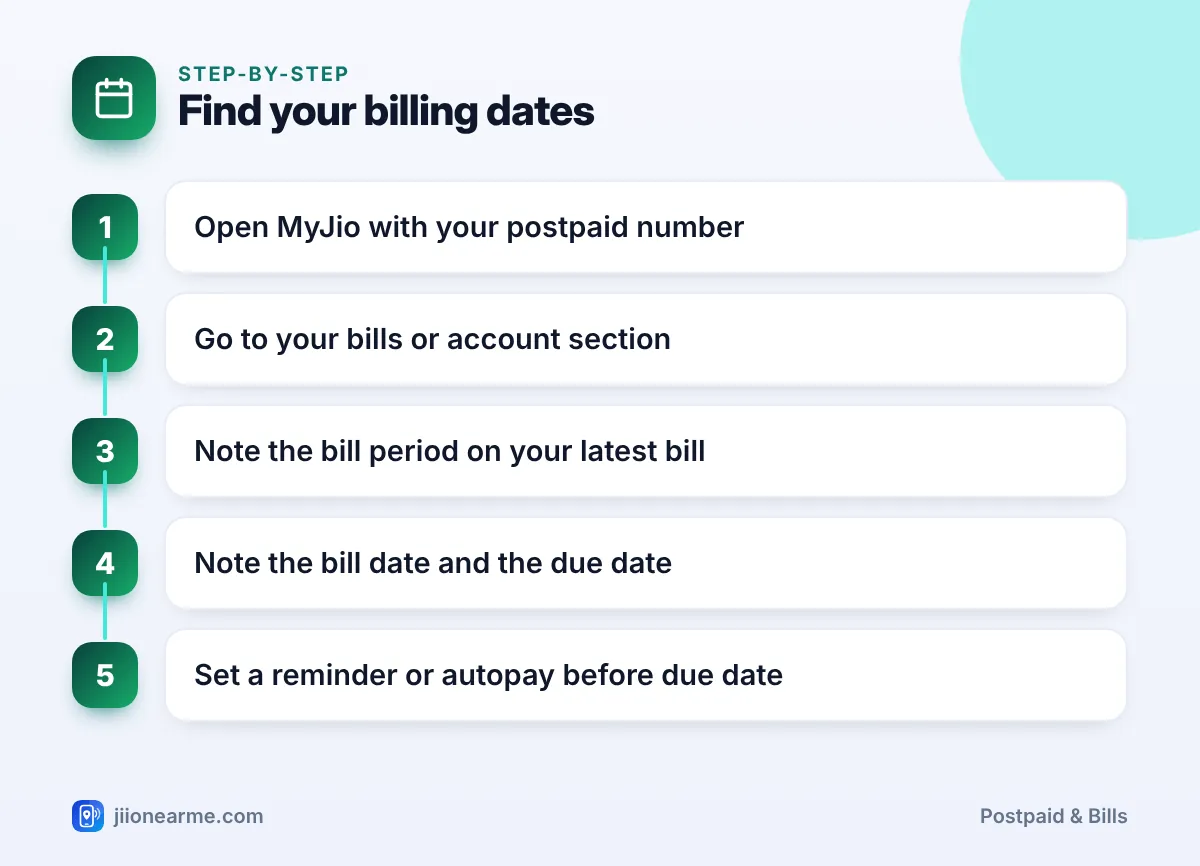
- Open the MyJio app and sign in with your postpaid number.
- Go to your bills or postpaid account section, on the home screen or in the menu (☰).
- Open your latest bill and note the bill period.
- Note the bill date and the due date.
- Set a phone reminder, or set up autopay, before the due date.
You can also see your bills by signing in on jio.com.
What Mid-Cycle Changes Do to Your Bill
Changes during a cycle do not wait for a new month. They show up on the next bill in parts.
- Plan change: If it applies immediately, you may see part-month charges for both the old and the new plan. If it applies from the next cycle, the new plan starts on the next bill.
- New family member: An add-on member who joins mid-cycle may show a part-month charge on the first bill after joining.
- Packs and services: Anything you buy or activate during the cycle appears on the bill for that cycle.
- New connection: Your first bill often covers only part of a cycle, from activation to the first bill date.
Planning Payments Around Your Cycle
A few habits make the cycle easy to manage:
- Use autopay. Autopay through MyJio, a UPI autopay mandate or a card pays on time without you remembering.
- Pay a few days early. Payments can take a little time to reflect, so do not wait for the last day.
- Watch unbilled usage. If it gets close to your credit limit, make a part payment to avoid restrictions.
- Check each bill. Autopay pays the amount due, so review the bill for errors before it is debited.
If your bill date falls at an awkward time of the month, you can ask customer care on 199 whether it can be changed for your account. Do not assume it can, and confirm any change in writing or by SMS.

Frequently Asked Questions
Is the Jio postpaid billing cycle the same for everyone?
No. Each account has its own cycle dates. Check your bill period in MyJio or on your bill.
Does the billing cycle follow the calendar month?
Not necessarily. Your cycle may start on any date and run for about a month from there.
What happens if I pay after the due date?
A late payment charge may be added to your next bill, and services may be restricted if the bill stays unpaid.
Why did a roaming charge appear a month later?
Roaming usage records from partner networks can arrive after your bill date. They are then added to a later bill.
Can I pay before my bill is generated?
Yes, you can usually make an advance or part payment. It is adjusted against your next bill.
Wrapping Up
The Jio postpaid billing cycle is simple once the dates are clear. The bill period is what you used, the bill date is when the bill is made, and the due date is when you must pay.
Note these dates from your latest bill, set up autopay or a reminder, and watch your unbilled usage during the month. That keeps your payments on time every cycle.
JIo Near me is an independent guide and is not affiliated with Reliance Jio. App menus, plans and policies can change – always confirm current details in the official MyJio app or on jio.com. We will never ask for your OTP, PIN or passwords.