Wi-Fi Calling, also called VoWiFi (Voice over Wi-Fi), lets your phone make and receive normal Jio calls over a Wi-Fi connection instead of the mobile tower. If your home or office has weak indoor signal but good Wi-Fi, it can make calls clearer and more reliable.
You use the regular dialler and your own Jio number. The person you call sees your number as usual and does not need Wi-Fi themselves. This explainer covers how Jio Wi-Fi Calling routes a call, what your phone needs, how to switch it on and what happens when you walk out of Wi-Fi range.
- Wi-Fi Calling carries regular Jio calls over Wi-Fi when mobile signal is weak.
- It uses your normal number and dialler, with no separate app or login.
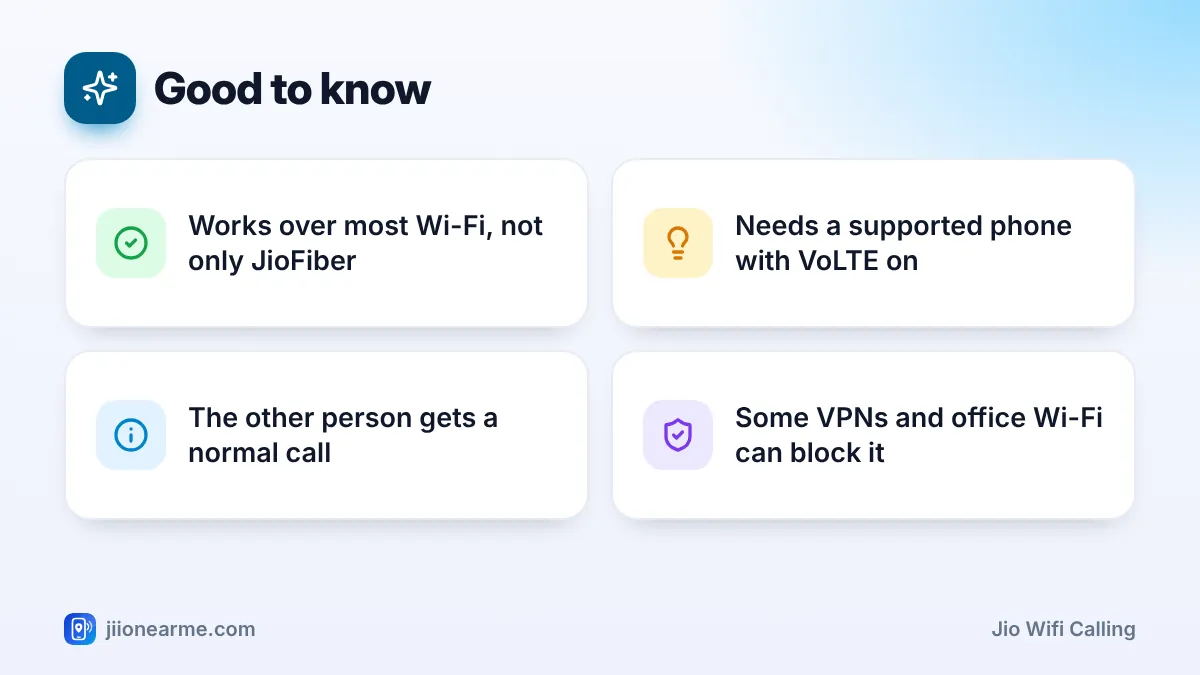
- Your phone must support VoWiFi, and VoLTE should be switched on.
- It generally works on any stable Wi-Fi, not only JioFiber or Jio AirFiber.
- Many phones can move a call between Wi-Fi and the mobile network as you move.
What Is Jio Wi-Fi Calling?
Think of Wi-Fi Calling as a second road for your calls. Normally, your phone sends a call over the air to a Jio tower using VoLTE. With Wi-Fi Calling, the phone can send the same call through your Wi-Fi router and the internet to Jio’s network instead.
Once the call reaches Jio, it is handled like any other call. That is why the person you call sees nothing different. Calls made this way are handled like regular calls on your plan, and you do not buy a separate pack for the feature.
It is especially useful in:
- Basements, inner rooms and lower floors where signal struggles.
- New buildings with thick concrete or glass that blocks signal.
- Areas at the edge of coverage, where the tower is far away.
How VoWiFi Routes Your Call Over Wi-Fi
Behind the scenes, a few steps happen in seconds:
- Your phone checks Wi-Fi. It confirms there is a working internet connection.
- It builds a secure tunnel. The phone creates an encrypted connection over the internet to a special gateway in Jio’s network.
- It registers for calling. Through that tunnel, the phone signs in to the same calling system that handles VoLTE calls.
- Calls flow through the tunnel. Your voice travels as data over Wi-Fi, then through Jio’s network to the other person.
The encryption protects your call while it crosses the internet, including on networks you do not own.
Wi-Fi preferred or mobile preferred
Some phones let you choose a calling preference. Wi-Fi preferred uses Wi-Fi whenever it is available. Mobile preferred sticks to the tower when signal is decent and uses Wi-Fi only when needed. The labels vary, and some phones decide automatically.
How Calls Hand Over Between Wi-Fi and Mobile Network
A common worry is what happens when you walk out of the house during a Wi-Fi call. Many phones and networks support a handover. As the Wi-Fi signal fades, the call moves to Jio’s mobile network using VoLTE, usually without you noticing.
Handover works best when:
- Your phone supports it and its software is up to date.
- There is usable Jio 4G or 5G signal outside.
- The Wi-Fi signal fades gradually rather than cutting out suddenly.
If the phone or network cannot hand over in that situation, the call may drop and you will need to call back. To reduce drops, wait for a call to end before leaving Wi-Fi range, or stay near the router during important calls.
| Point | Wi-Fi Calling | VoLTE call | Internet app call |
|---|---|---|---|
| Uses | Your Wi-Fi connection | Jio tower | Wi-Fi or mobile data |
| Number shown | Your Jio number | Your Jio number | Your app account |
| App needed | No | No | Yes, on both sides |
| Best when | Indoor signal is weak | Signal is good | Both people use the same app |
Wi-Fi Calling needs a stable connection, not a fast one. A slow but steady network often works better than a fast one that keeps dropping. Sitting closer to the router can help.
What Your Phone Needs for Jio Wi-Fi Calling
Before you switch it on, check these requirements:
- A supported phone. Most recent Android phones and iPhones support VoWiFi with Jio. Older or imported models may not.
- Updated software. Install system updates, and on iPhone check for carrier settings updates under Settings > General > About.
- VoLTE switched on for your Jio SIM.
- An active Jio number with a valid plan.
- A working Wi-Fi connection. It does not have to be JioFiber or Jio AirFiber.
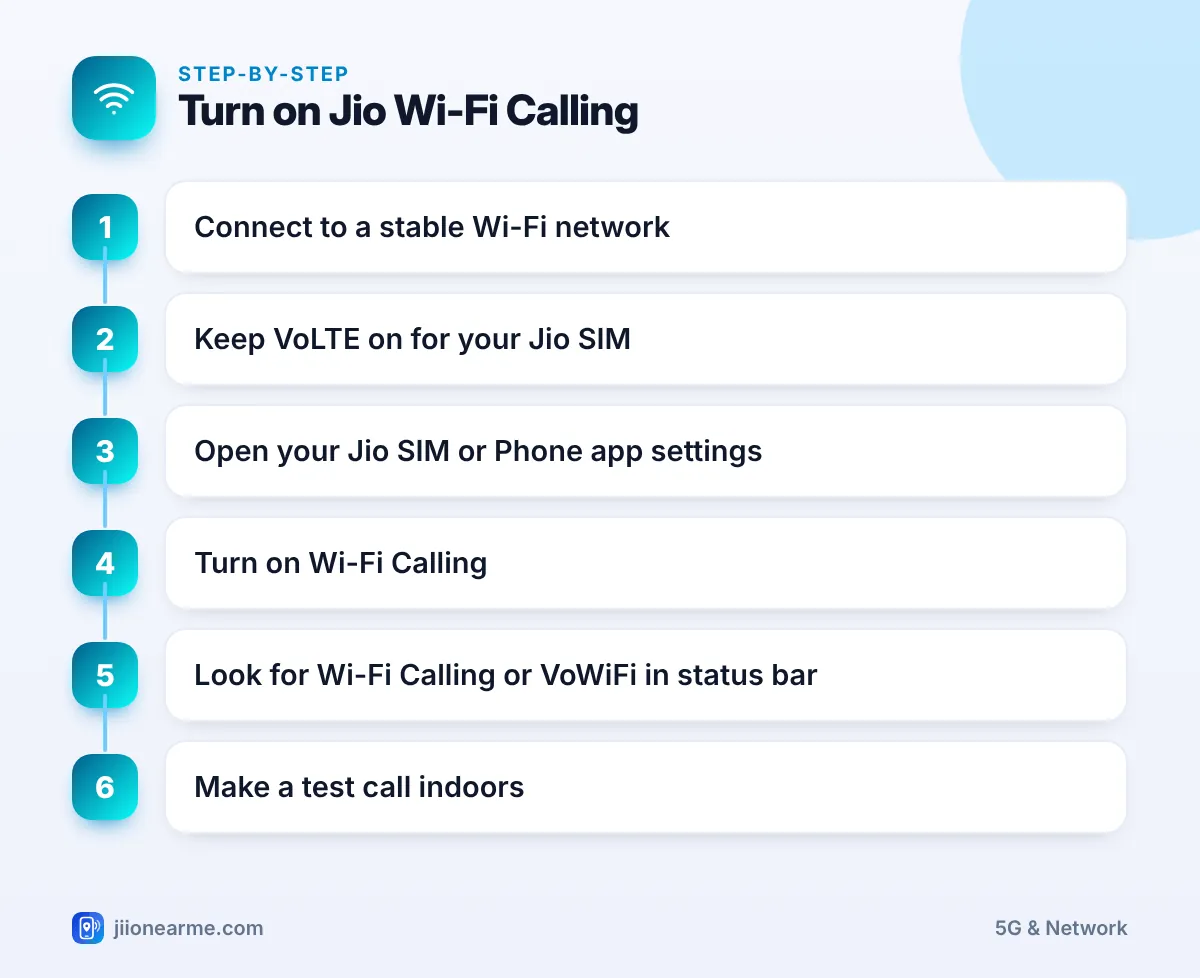
How to Turn On Jio Wi-Fi Calling
Menu names vary by brand and software version, but the switch is usually easy to find.
- Most Android phones: Settings > Network & internet (or Mobile network) > select the Jio SIM > Wi-Fi calling.
- Samsung: Open the Phone app, tap the three-dot menu (⋮) > Settings > Wi-Fi calling. Some models also have a quick panel tile.
- Xiaomi, Redmi and POCO: Settings > SIM cards & mobile networks > select the Jio SIM > Make calls using Wi-Fi.
- iPhone: Settings > Phone > Wi-Fi Calling, or Settings > Mobile Service > select the Jio line > Wi-Fi Calling on dual SIM models. Turn on Wi-Fi Calling on This iPhone.
After turning it on, connect to Wi-Fi and wait a minute. Look for Wi-Fi Calling, VoWiFi or a phone icon with Wi-Fi waves in the status bar. On iPhone, the network name may show as Jio Wi-Fi in Control Centre. Then make a short test call.
Make your first test call from the room with the poorest signal, such as a back bedroom or basement. That is where Wi-Fi Calling should make the clearest difference.
Common Reasons Wi-Fi Calling Does Not Work
If the Wi-Fi Calling label never appears, try these checks:
- Make sure Wi-Fi has a working internet connection by opening a website.
- Turn off any VPN app, as some VPNs interfere with Wi-Fi Calling.
- Try a different Wi-Fi network. Some office, hostel or public networks block the secure connection it needs.
- Restart the phone and the Wi-Fi router.
- Install pending software and carrier updates.
- Confirm that VoLTE is on for your Jio SIM.
Wi-Fi Calling availability outside India depends on Jio’s rules and your phone, so check jio.com before relying on it when you travel. If it still does not work at home, call Jio on 199 from your Jio number to ask whether the feature is active on your line.
Frequently Asked Questions
Does Jio Wi-Fi Calling work only on JioFiber?
No. It generally works on any stable Wi-Fi connection with internet access, including other broadband services and mobile hotspots.
Does Wi-Fi Calling use my mobile data balance?
No. Calls go over your Wi-Fi connection. They use a small amount of Wi-Fi data, not your Jio mobile data balance.
Will the person I call know I am on Wi-Fi?
No. They see your normal Jio number and receive a regular call. They do not need Wi-Fi or any app.
What happens if the Wi-Fi drops during a call?
If your phone and the network support handover, the call moves to Jio’s mobile network. Otherwise, the call may end and you will need to call again.
Can I use Wi-Fi Calling with mobile signal switched off?
On many phones, yes. If airplane mode is on and Wi-Fi is turned back on, Wi-Fi Calling can still work. Behaviour varies by phone.
Final Thoughts
Jio Wi-Fi Calling is a simple fix for weak indoor signal. Turn it on, keep VoLTE active and stay on a stable Wi-Fi network, and your calls can go through your router instead of a distant tower. If the label never appears, check your phone’s support, updates and Wi-Fi settings before contacting Jio support.
JIo Near me is an independent guide and is not affiliated with Reliance Jio. App menus, plans and policies can change – always confirm current details in the official MyJio app or on jio.com. We will never ask for your OTP, PIN or passwords.
