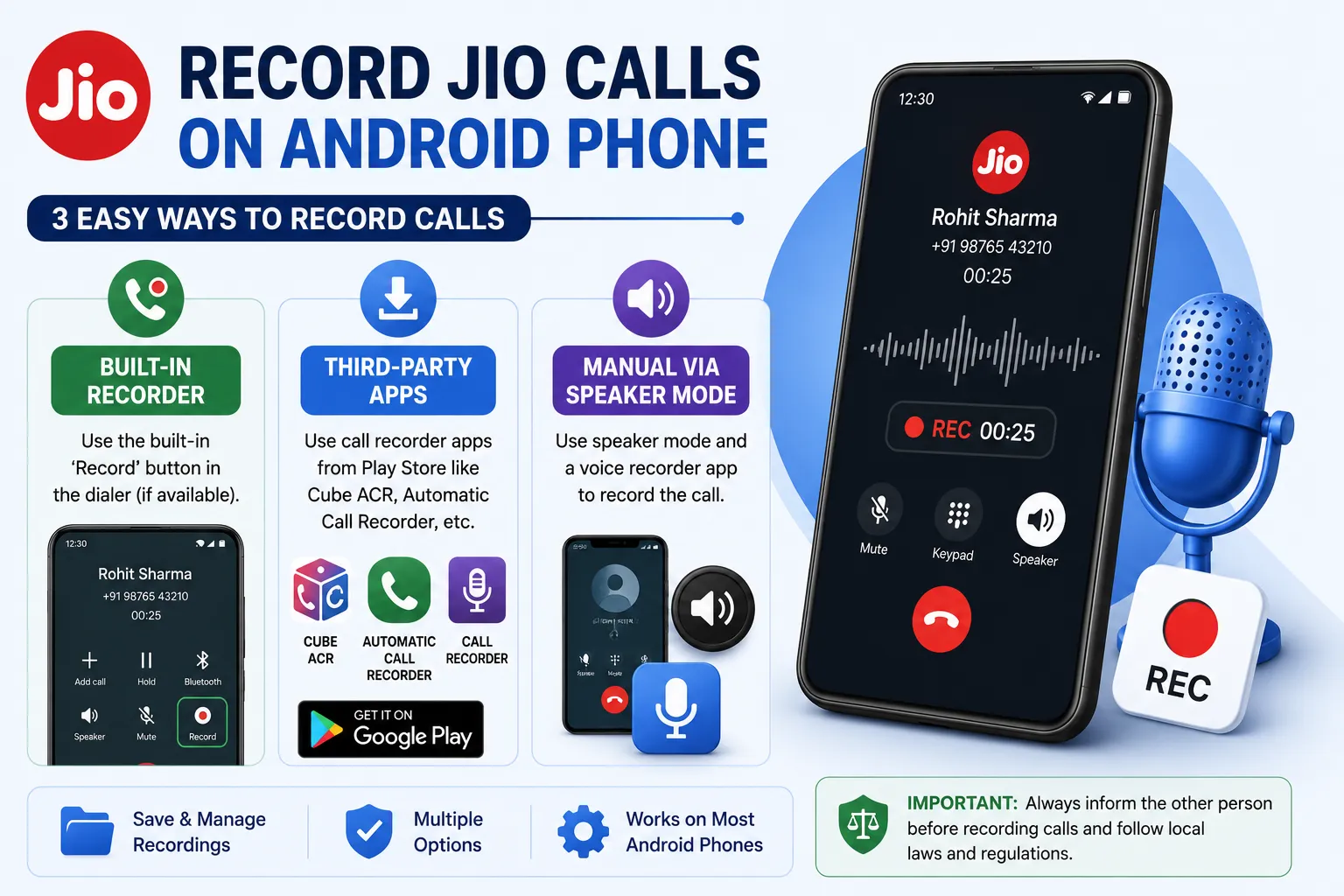
Many Jio users search for ways to “get” a call recording after a conversation has already ended, hoping the network itself stores and can hand over the audio. That’s a common misunderstanding worth clearing up first. This guide explains exactly what Jio does and doesn’t offer, how to record calls going forward on JioPhone, JioBharat, and Android devices running on a Jio SIM, and what the law in India says about recording someone else’s voice.
Does Jio Store or Provide Past Call Recordings to Customers?
No. Jio, like every telecom operator, does not record subscriber phone calls for playback or downloading through the MyJio app, website, or customer care. Telecom providers retain limited call detail records (numbers, duration, timestamps) for billing and regulatory purposes, but they do not store the audio content of calls, and they cannot legally hand over such recordings to individual customers even if they did. Call audio is only ever accessible to law enforcement agencies through a formal legal process, not to the general public.
If you need a recording of a call, the recording has to be captured live, on-device, at the time the call happens. The rest of this guide covers exactly how to do that.
Is It Legal to Record Calls in India?
Before recording any call, it helps to know where you stand legally:
- Recording a call you are personally a part of is generally permitted in India for personal use.
- Recording a call between two other people without their knowledge or consent can violate privacy laws.
- Using a recorded call as evidence, sharing it publicly, or recording someone without consent for surveillance purposes can create legal liability.
- Since late 2022, Google has restricted the Accessibility API access that most third-party call recorder apps relied on, which is why many such apps stopped working reliably on newer Android versions.
Always record responsibly, and inform the other party if the conversation is sensitive or business-related.
Method 1: Recording Calls on JioPhone and JioBharat Devices
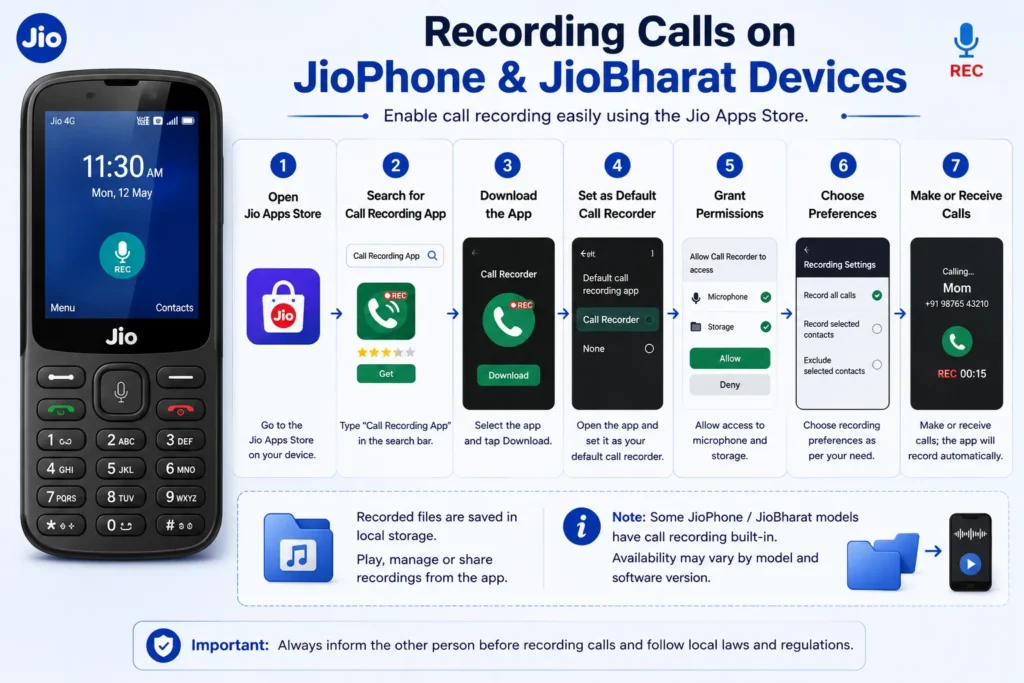
JioPhone and JioBharat devices run on the KaiOS platform rather than Android, so they don’t support most standard Android call recorder apps. However, Jio provides a workaround through its own app store.
Steps to enable call recording on JioPhone / JioBharat:
- Open the Jio Apps Store on your device.
- Search for “Call Recording App” in the search bar.
- Select a listed call recorder app and tap Download, then accept the permissions and terms.
- Once installed, open the app and set it as your default call recorder.
- Grant the app permission to access your microphone and storage.
- Choose your recording preferences — for example, record all calls automatically or select specific contacts to exclude.
- Make or receive a call as usual; the app will record it automatically based on your settings.
Recorded files are typically saved to local storage and can be played back or shared directly from the call recorder app. Note that some JioPhone models come with call recording built in, while others require this app download — availability depends on the exact model and software version.
Method 2: Recording Jio Calls on an Android Smartphone
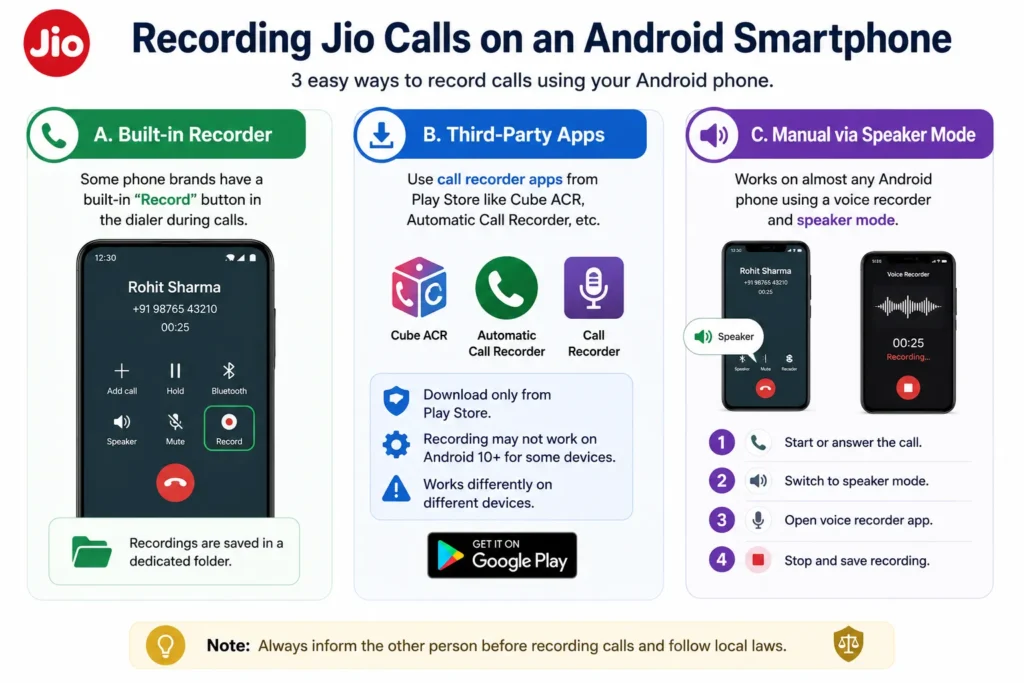
If you’re using a Jio SIM in a regular Android smartphone, recording works at the device level, not the network level, so the method depends on your phone brand and Android version.
Option A: Built-in Recorder (Some Phone Brands Only)
Certain manufacturers — including some Samsung, Xiaomi, and Chinese OEM devices sold in India — include a native “Record” button inside the phone dialer during an active call. If present, tap it during the call to start and stop recording; files are usually saved to a dedicated folder in your phone’s storage or Files app.
Option B: Third-Party Call Recorder Apps
Apps such as Cube ACR, Automatic Call Recorder, or similar tools from the Play Store can add recording capability. Keep in mind:
- Due to Google’s Play Store policy changes, many of these apps can no longer record calls in the background on Android 10 and above unless the phone manufacturer specifically allows it.
- Some apps work around this using an accessibility-service or speaker-detection method, with varying reliability across devices.
- Always download call recorder apps only from the official Play Store to avoid malware.
Option C: Manual Recording via Speaker Mode
This universal workaround works on almost any Android phone regardless of restrictions:
- Start or answer the call as normal.
- Switch the call to speaker mode.
- Open a separate voice recorder app on the same phone (or a second device).
- Start recording while the call plays through the speaker.
- Stop the recording once the call ends and save the file.
This method captures both sides of the conversation but depends on ambient noise levels and speaker volume for audio quality.
Also read our article on How to Change Message Wishlist Settings in Jio 4G Voice App?
Method 3: Using JioChat and Voice Notes (Not Call Recording)
Some users confuse recording live calls with sending voice messages inside Jio’s own apps. In JioChat, you can record and send a short voice note by tapping and holding the microphone icon in a chat window — but this is a separate feature for sending recorded audio messages, not for capturing an ongoing phone call.
Troubleshooting Common Issues
- App won’t record incoming calls: Confirm the app has microphone and storage permissions enabled in your phone’s app settings, and check that it’s set as the default recording app if required.
- Recording stops midway: This is often due to Android’s background restrictions on newer OS versions; try enabling “unrestricted battery usage” for the recorder app.
- Poor audio quality with the speaker method: Reduce background noise, increase call volume, and keep the recording device close to the phone’s speaker.
- No record option appears at all: Your phone model or Android version may not support native or accessibility-based call recording; the speaker + separate recorder method remains the most reliable fallback.
Frequently Asked Questions
Can Jio customer care send me a recording of a call I already made?
No. Jio does not store call audio and cannot provide recordings of past conversations to customers under any circumstances.
Do all JioPhone models support call recording?
Not all. Some models have it built in, while others need a call recorder app installed from the Jio Apps Store, and a few older models may not support it at all.
Why did my call recorder app stop working after an Android update?
Google restricted the background permissions many call recorder apps used to rely on, starting with Android 10 and later versions, which caused many third-party apps to lose automatic recording ability.
Is it legal to record a business call on Jio without telling the other person?
Recording a call you’re part of is generally allowed for personal use in India, but using it for other purposes, sharing it publicly, or recording others without consent can raise legal concerns. When in doubt, inform the other party.
Conclusion
There’s no way to retrieve a past call recording directly from Jio, since the network doesn’t store call audio for customers. What you can do is set up recording in advance — through the Jio Apps Store on JioPhone and JioBharat devices, a built-in dialer feature on supported Android phones, a trusted third-party app, or the universal speaker-and-record method. Choose the option that matches your device, keep the legal boundaries in mind, and test your setup with a short call before relying on it for anything important.
Also read our article on How I Can Prevent Calls from Jio Voice Call App: A Complete Guide
